
Unlocking Modular Synths:
A Beginner’s Guide
Welcome to the world of modular synthesizers, where you become the architect of your own sounds! This guide will introduce you to the basic components and patching techniques of modular synthesis, offering a hands-on approach to create unique and expressive sounds. Prepare to explore the vast sonic landscapes possible through modular synthesis, learning to connect various modules to sculpt soundscapes limited only by your imagination. This beginner’s guide will equip you with the foundational knowledge needed to navigate this exciting world, from understanding the core modules to creating complex, evolving sounds. Let’s begin your modular synth journey!
A Glimpse into the Modular Landscape
Key Components:
Generating Sound: Voltage-Controlled Oscillators (VCOs)
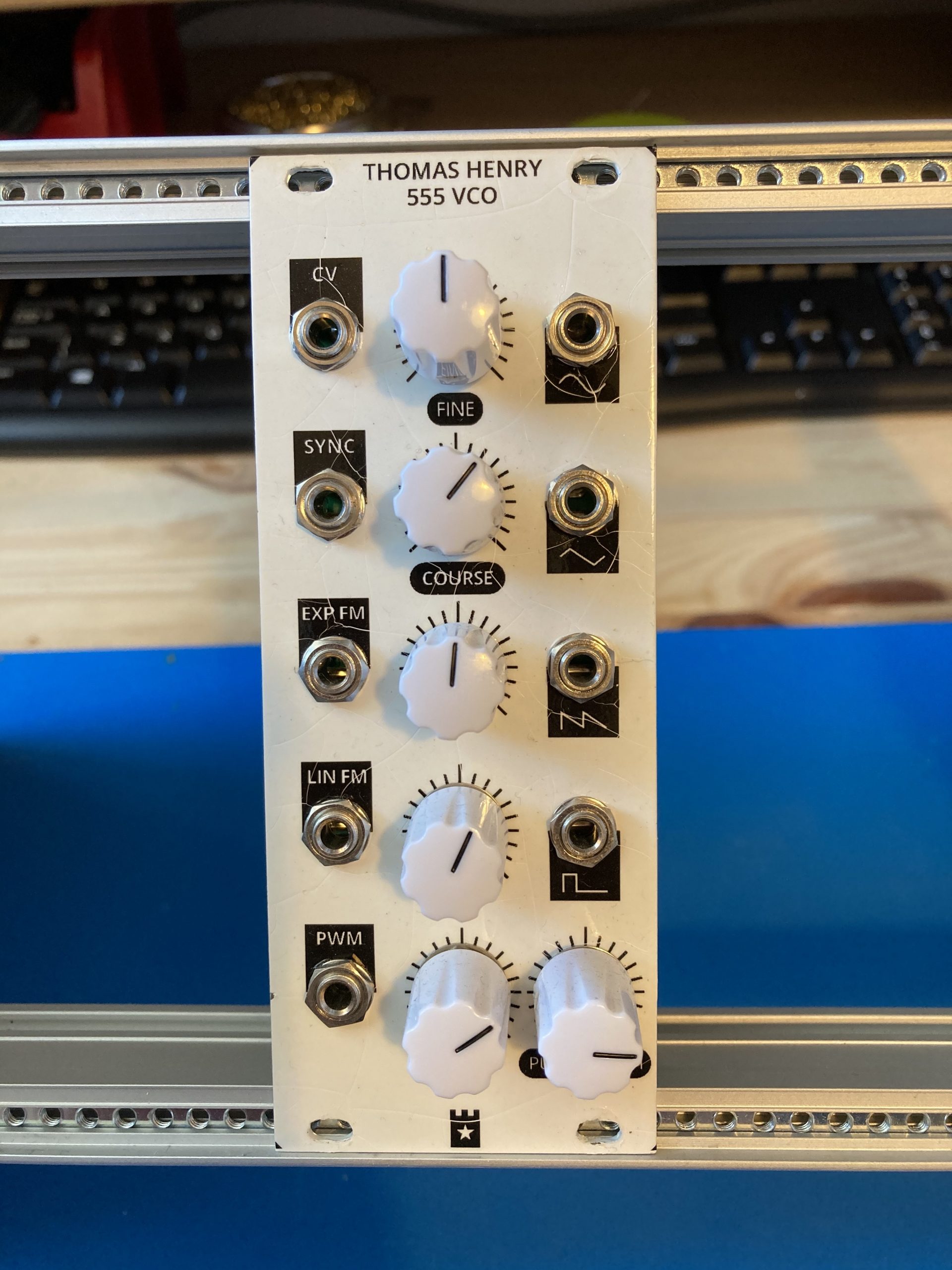
VCOs are the core sound generators in modular synths. They produce raw audio waveforms like sine, square, sawtooth, and triangle. Pitch is controlled by CV from a keyboard, sequencer, or other modules. VCOs offer fine-tuning controls to shape the sound. VCOs can create melodies, rhythms, or complex textures when patched with other modules.
Shaping Timbre: Voltage-Controlled Filters (VCFs)
VCFs filter frequencies, allowing you to shape a sound’s tone. Common types include low-pass, high-pass, and band-pass. Controlling the cutoff frequency with CV enables dynamic, evolving sounds. Experiment with resonance to add depth and color.
Envelope Generator (EG)
An Envelope Generator shapes a sound’s volume or parameters over time using an ADSR curve.
Attack (A): The time it takes for the sound to rise from silence to its peak.
Decay (D): The time it takes for the sound to drop from the peak to the sustain level.
Sustain (S): The level the sound holds as long as the key or gate signal is active.
Release (R): The time it takes for the sound to fade back to silence after the key is released.
Controlling Dynamics: Voltage-Controlled Amplifiers (VCAs)
VCAs control the volume of the audio signal. They enable dynamic changes like swells, decays, and percussive attacks. VCAs can be modulated by CV from LFOs or envelopes to shape the volume over time, creating rhythmic and percussive sounds.
What is a VCO?
A Voltage-Controlled Oscillator (VCO) is one of the core sound-generating modules in a synthesizer. It creates audio signals (waveforms) whose frequency (pitch) can be controlled using voltage. These waveforms serve as the raw sound source that is later shaped by filters, envelopes, and other modules in the signal path.
How Does a VCO Work?
- Oscillation:
The VCO generates repeating waveforms by electronically “oscillating” a signal. - Voltage Control:
The frequency (pitch) of the waveform is determined by the voltage applied to its 1V/Oct input. For every 1-volt increase, the pitch doubles (an octave higher). - Waveform Selection:
VCOs typically provide several types of waveforms, each with a distinct sound character. You can choose one waveform at a time or blend multiple waveforms.
Common VCO Waveforms and Their Characteristics
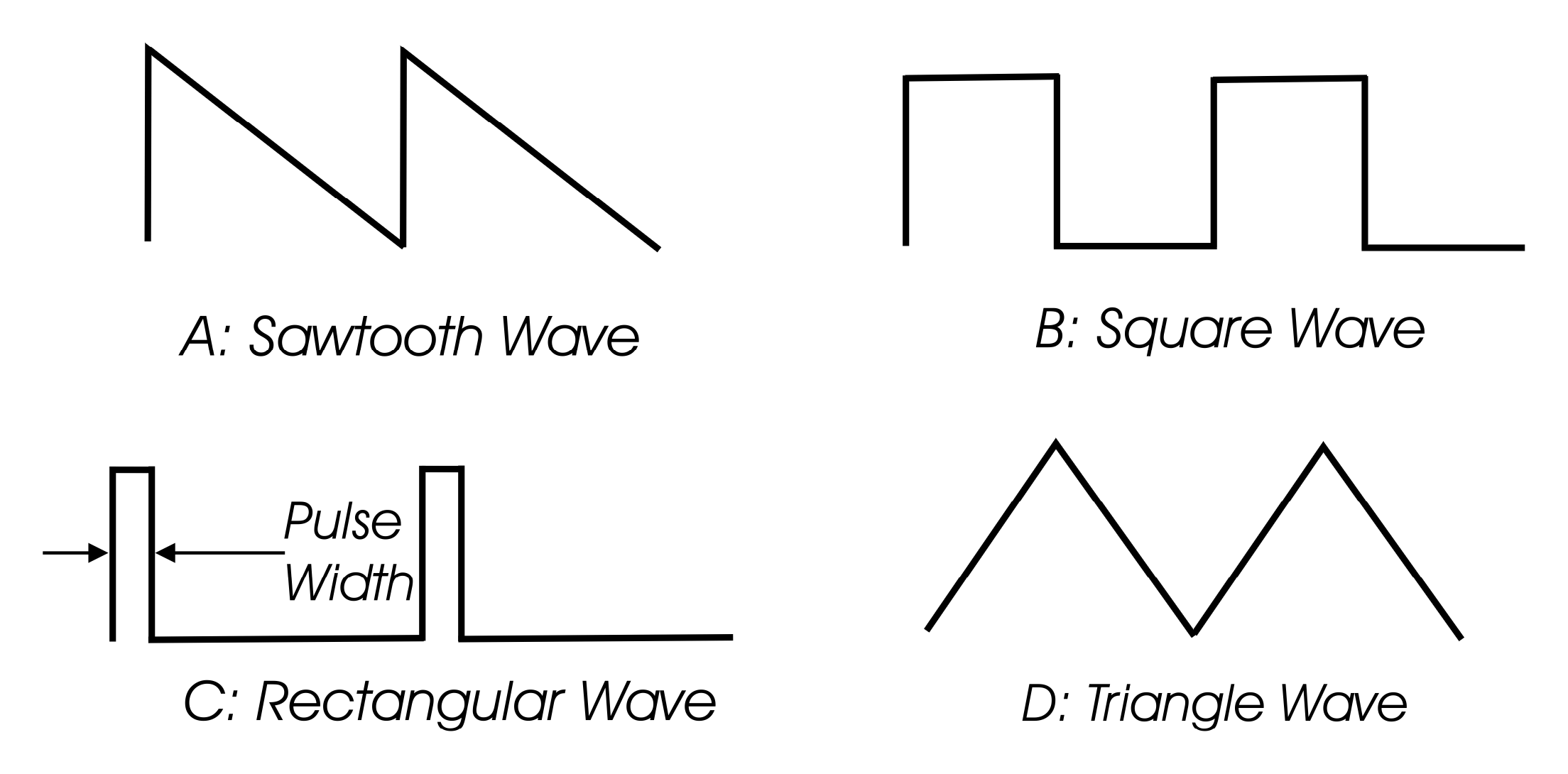
- Sine Wave Sound: Pure and smooth. Harmonic Content: Contains only the fundamental frequency (no overtones). Use Cases: Soft basses. Subtle tones. FM synthesis (frequency modulation).
- Triangle Wave Sound: Softer and warmer than a square wave but with more harmonics than a sine wave. Harmonic Content: Contains odd harmonics, but they fade quickly. Use Cases: Warm pads. Smooth leads.
- Sawtooth Wave Sound: Bright, buzzy, and sharp. Harmonic Content: Contains both odd and even harmonics, giving it a rich, full sound. Use Cases: Strings. Brass sounds. Leads and basslines.
- Square Wave Sound: Hollow and woody. Harmonic Content: Contains only odd harmonics, giving it a distinct timbre. Use Cases: Woodwind-like sounds (e.g., clarinet-like tones). Pulse-width modulation (PWM) for dynamic, evolving sounds.
- Pulse Wave (a variation of the square wave) Sound: Similar to a square wave but more nasal or sharper depending on the pulse width. Harmonic Content: The harmonic balance changes with pulse width. Use Cases: Rich basslines. Classic “chiptune” sounds.
Key Features
- Frequency Control:
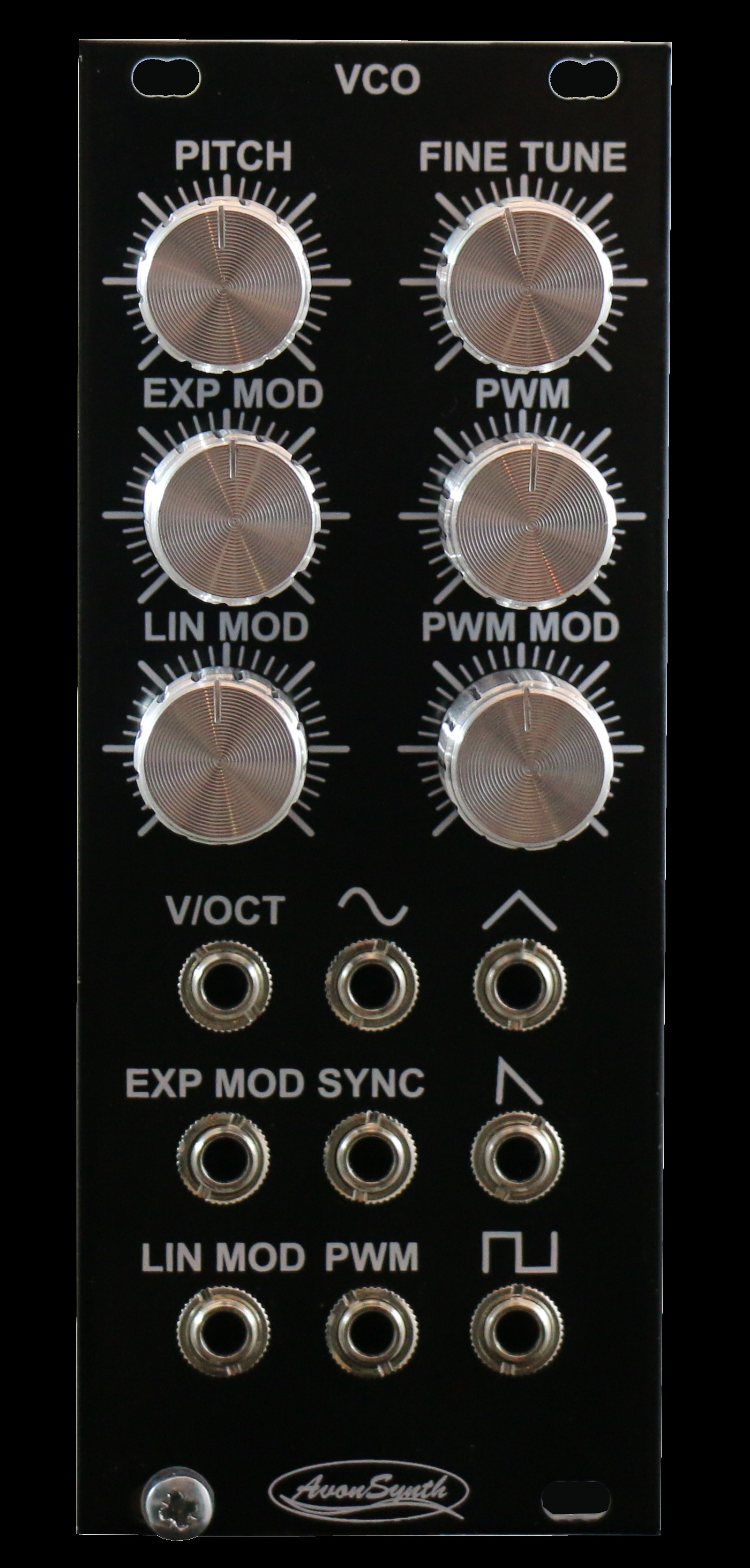
- Allows you to set the pitch manually (coarse/fine knobs) or modulate it with control voltages (CV).
- Waveform Output:
- VCOs usually have multiple outputs for different waveforms, allowing simultaneous routing of different timbres to different parts of your patch.
- Pulse Width Modulation (PWM):
- Adjusts the shape of a pulse wave to vary its harmonic content dynamically.
- Controlled manually or via a CV input for evolving timbres.
- Sync:
- Hard Sync: Forces one oscillator to reset its phase in sync with another, creating sharp, harmonic overtones.
- Soft Sync: Allows partial phase locking for smoother effects.
- FM (Frequency Modulation):
- Allows one oscillator to modulate the pitch of another for complex, bell-like tones or harsh metallic sounds.
How to Use VCOs in Sound Design
- Basslines Start with a sine or triangle wave for a clean, deep sound. Add a sawtooth for more edge or a square wave for a hollow timbre.
- Leads Use a sawtooth for brightness or combine it with a square wave for added body. Modulate the pitch with an envelope or LFO for vibrato or pitch sweeps.
- Pads Combine multiple oscillators slightly detuned for a lush, chorusing effect. Use sine or triangle waves for softer tones or sawtooth for brighter, shimmering pads.
- Percussion Use a sine wave for simple kicks and toms. Modulate pitch with a fast-decaying envelope for the punch of percussive sounds.
VCO in Modular Patching
- Pitch Control:
- Connect the 1V/Oct CV input of the VCO to a MIDI-to-CV converter or sequencer to control pitch.
- Waveform Output:
- Patch the selected waveform output (e.g., saw, square) to the next stage, such as a filter or VCA.
- Modulation:
- Use LFOs to modulate the pitch for vibrato.
- Use another VCO to modulate frequency (FM) for metallic or complex tones.
- Mixing Waveforms:
- Route multiple waveform outputs to a mixer module to blend them for richer sounds.
What is a VCF?
A Voltage-Controlled Filter (VCF) is a synthesizer module that shapes the timbre of an audio signal by removing or emphasizing specific frequency ranges. It allows for dynamic sound sculpting by using control voltage (CV) to modulate the cutoff frequency and resonance.

How Does a VCF Work?
A VCF takes an audio signal as its input and processes it based on its filter type and settings:
- Cutoff Frequency: Determines the point at which frequencies are reduced or amplified.
- Resonance (Q): Emphasizes frequencies around the cutoff point, adding a sharper or more pronounced sound.
Common Types of VCFs
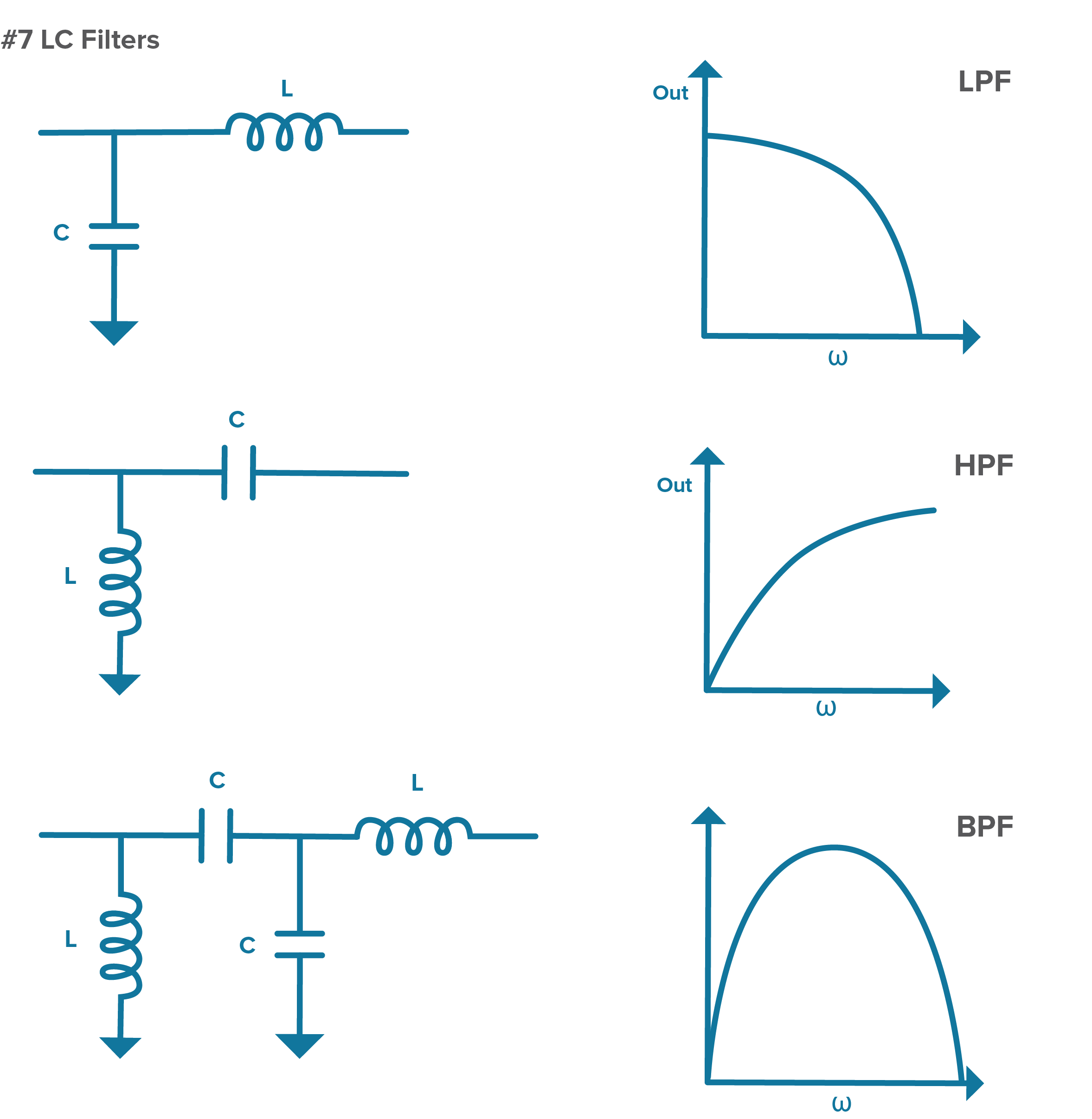
- Low-Pass Filter (LPF): Effect: Allows frequencies below the cutoff point to pass while attenuating higher frequencies. Use Cases: Smooth, warm tones. Removing harshness from bright sounds. Common in bass and pad design.
- High-Pass Filter (HPF): Effect: Allows frequencies above the cutoff point to pass while attenuating lower frequencies. Use Cases: Thinning out sounds for clarity. Removing low-end rumble. Ideal for percussion or sharp leads.
- Band-Pass Filter (BPF): Effect: Allows frequencies within a certain range (band) to pass while attenuating frequencies outside that range. Use Cases: Creating nasal or “radio-like” tones. Sharply defining certain frequency ranges.
- Notch (Band-Stop) Filter: Effect: Attenuates a narrow range of frequencies while allowing others to pass. Use Cases: Removing unwanted frequencies. Subtle sound shaping.

Key Features
- Cutoff Frequency Control:
- The most important parameter; defines which frequencies are filtered.
- Can be modulated using envelopes, LFOs, or CV inputs for dynamic changes.
- Resonance (Q):
- Boosts frequencies around the cutoff point, creating a “peaky” sound.
- At high settings, resonance can cause self-oscillation, turning the filter into a sine wave oscillator.
- Slope (dB/oct):
- Determines how steeply frequencies are attenuated beyond the cutoff. Common slopes are 12dB/oct or 24dB/oct.
- Steeper slopes create sharper filtering.
- CV Input for Cutoff/Resonance:
- Allows modulation of the cutoff or resonance using external CV sources (like an envelope generator or sequencer).
How to Use a VCF in Sound Design
- Subtractive Synthesis: Start with a harmonically rich waveform (e.g., sawtooth or square). Use a low-pass filter to progressively remove higher harmonics, sculpting the sound. Modulate the cutoff with an envelope generator for dynamic movement.
- Percussive Sounds: Use a fast-decay envelope to modulate the cutoff for sharp, punchy effects. Combine with a high resonance setting for snappy transients.
- Sweeps and Transitions: Automate or use an LFO to modulate the cutoff for dramatic filter sweeps. Adjust resonance to emphasize the sweep effect.
- Adding Texture: Use a band-pass filter to isolate certain frequencies for a more textured, nasal sound. Combine with modulation for evolving tones.
VCF in Modular Synth Patching
Basic Signal Path:
- Audio Input:
- Patch the output of your VCO (e.g., saw, square) to the audio input of the VCF.
- Cutoff Modulation:
- Patch an envelope generator (ADSR) or LFO to the CV input for the cutoff.
- The envelope creates dynamic shaping (e.g., opening and closing the filter), while the LFO adds movement.
- Audio Output:
- Patch the VCF’s output to the next stage (e.g., VCA or effects).
Example Patch for a Bassline:
- Patch a sawtooth wave from the VCO into the VCF audio input.
- Patch the Gate signal (from MIDI-to-CV or sequencer) into an ADSR envelope.
- Patch the envelope’s output to the VCF CV input for cutoff modulation.
- Adjust cutoff and resonance to sculpt the bass tone.
Using the VCF as an Oscillator:
- Set the resonance to maximum to make the VCF self-oscillate, producing a pure sine wave.
- Control the pitch by sending a 1V/oct signal to the filter’s CV input.
Tips for Using VCFs in Sound Design
- Dynamic Timbres: Combine slow LFOs and envelopes to create evolving sounds in pads and ambient textures.
- Rhythmic Filtering: Use sequencers or synced LFOs to rhythmically modulate the cutoff for dynamic patterns.
- Layering Filters: Use multiple filters in series (e.g., a low-pass followed by a high-pass) for precise control over frequency shaping.
- Resonance Caution: Too much resonance can overpower the sound or cause distortion—use it thoughtfully.
The VCF is the timbre sculptor of your synth, turning raw waveforms into expressive, dynamic, and character-rich sounds!
Envelope Generators (EG):
Meaning and Explanation
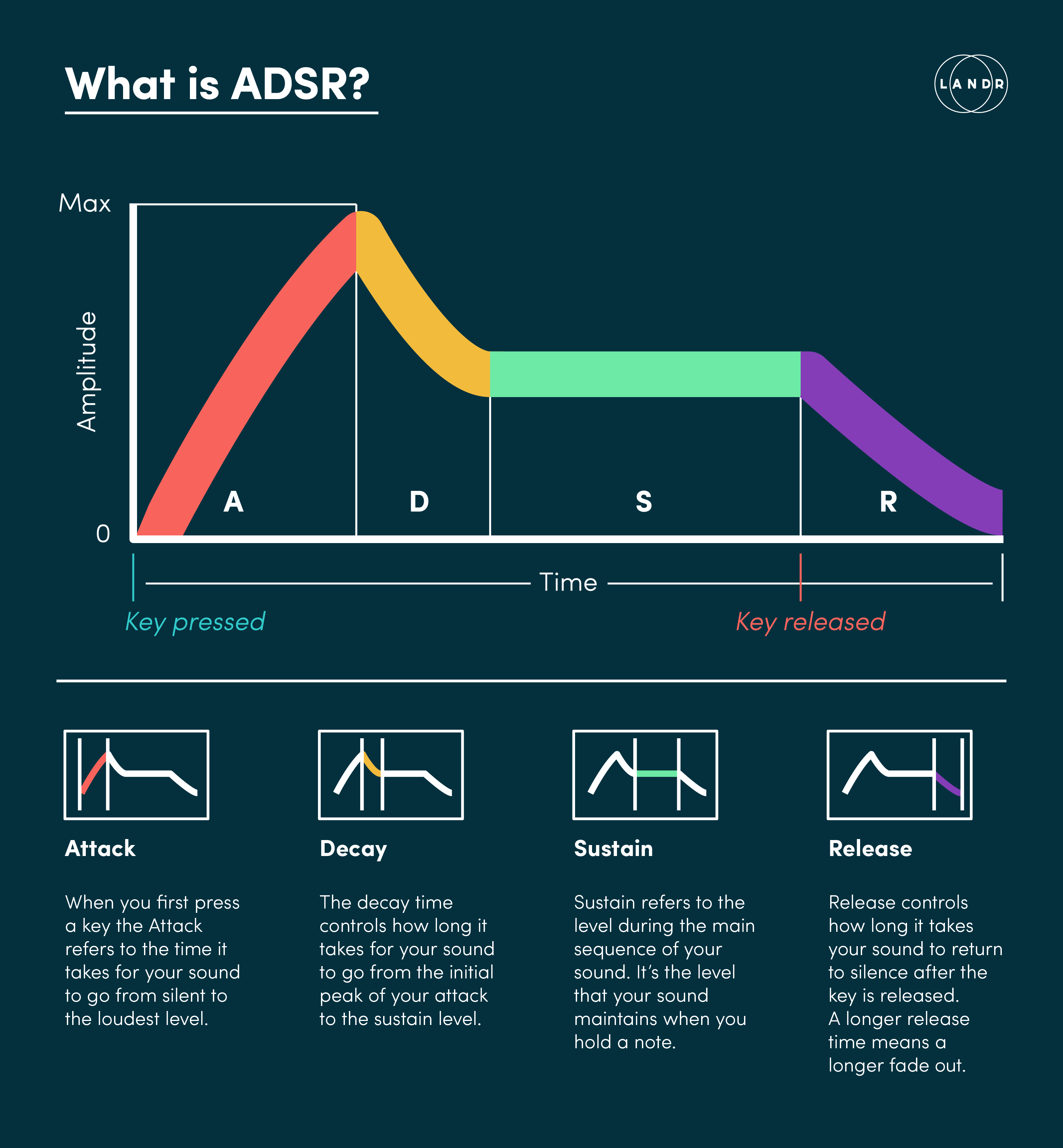
An Envelope Generator (EG) is a tool in synthesis that shapes how a sound evolves over time. It defines the progression of the sound’s amplitude, filter cutoff, or other parameters. The envelope is typically represented by four stages: Attack, Decay, Sustain, and Release (ADSR).
- Attack (A): The time it takes for the sound to reach its peak level after the key is pressed.
- Decay (D): The time it takes for the sound to fall from the peak level to the sustain level.
- Sustain (S): The level the sound holds while the key is pressed. It’s not a time parameter but a level.
- Release (R): The time it takes for the sound to fade to silence after the key is released.
These stages work together to create the “shape” of the sound, from percussive hits to long, swelling pads.
Envelope Differences Across Instruments
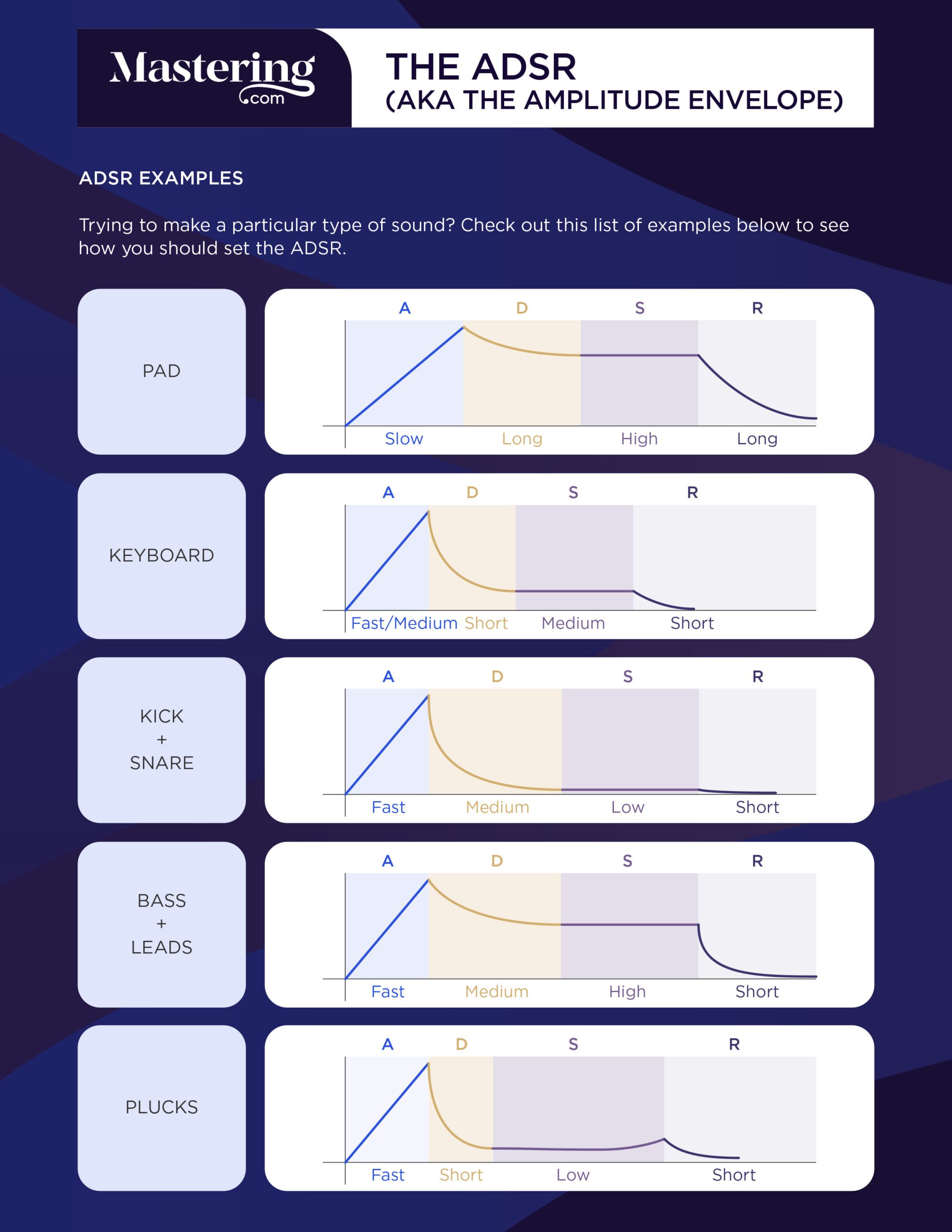
The role of the envelope changes depending on the type of sound you’re designing:
Pads
- Envelope Behavior: Smooth and gradual evolution is key.
- Attack: Long (to create a slow fade-in).
- Decay: Medium or long (smooth transition).
- Sustain: High (holding a steady, lush level).
- Release: Long (for a smooth fade-out).
- Result: Ethereal, evolving soundscapes with no sharp transients.
Percussion
- Envelope Behavior: Quick and snappy to simulate drum hits or plucks.
- Attack: Very short (instant impact).
- Decay: Short (quick fade from peak).
- Sustain: Low or none (for punchy, short sounds).
- Release: Short or zero (immediate silence).
- Result: Crisp, percussive sounds like drum hits or mallets.
Keyboards (Plucks, Leads, and Basses)
- Envelope Behavior: Can vary depending on style (percussive, sustained, or melodic).
- Attack: Short or medium (snappy or smooth entry).
- Decay: Medium (controlled drop to sustain level).
- Sustain: Medium to high (to hold notes as required).
- Release: Medium or short (natural fade).
- Result: Dynamic sounds for expressive playing or rhythmic phrases.
Knobs on Envelope Generator Modules
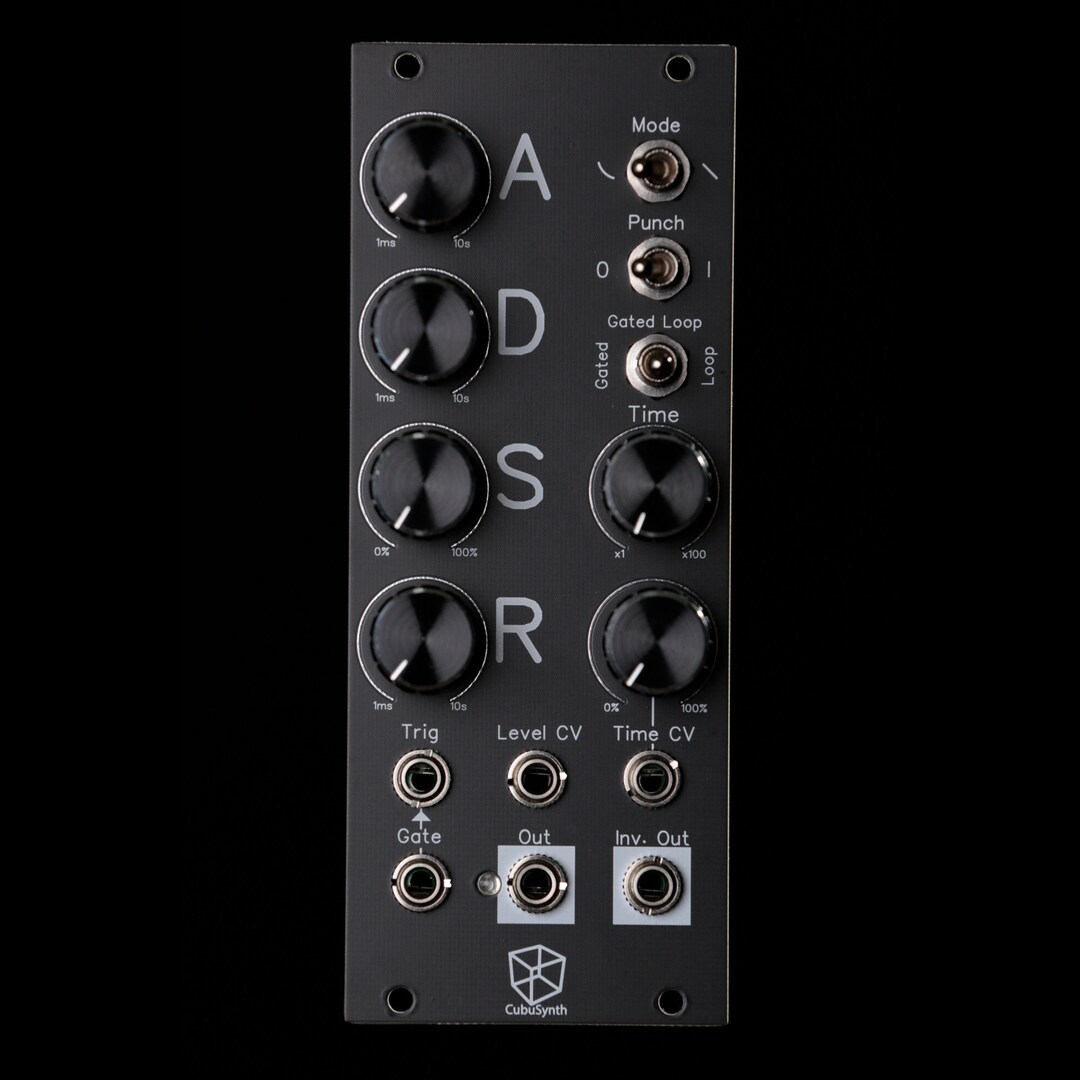
- Attack, Decay, Sustain, Release Knobs:
- These directly control the envelope stages.
- Turning the Attack knob increases the rise time, while adjusting the Decay or Release knobs changes their durations.
- Shape Controls (if available):
- Some EGs allow you to alter the curve of each stage (linear, exponential, logarithmic) for more precise shaping.
- Example: Exponential decay for snappier percussion sounds.
- Cycle/Loop Mode (optional):
- Certain EGs can loop the envelope, essentially turning it into an LFO.
- This creates repeating modulation for rhythmic patterns or evolving textures.
CV Inputs on Envelope Modules
- Gate/Trigger Input:
- A gate signal starts the envelope, usually sent from a sequencer, keyboard, or other module.
Example: Pressing a key sends a gate signal to the envelope, which then modulates a VCA.
- CV Modulation Inputs:
- CV inputs allow modulation of the envelope stages themselves (e.g., modulating the attack time with an LFO).
Example: Patch an LFO to the attack CV input to create evolving, dynamic swells.
- Output(s):
- Primary Output: Sends the envelope shape as CV to modulate other modules (e.g., a VCF or VCA).
- Multiple Outputs (if available): Some modules offer inverted or bipolar outputs for more complex patching.
Patching Envelopes in Eurorack Systems
- Basic Patch (VCA Modulation):
- Envelope Generator → VCA CV Input
- A gate signal triggers the envelope, controlling the amplitude of a sound source (e.g., VCO or noise).
- Advanced Patch (Filter Modulation):
- Envelope Generator → VCF Cutoff CV Input
- The envelope shapes the filter’s cutoff frequency dynamically, adding movement to the timbre.
- Dual Role Patch:
- Use one envelope to modulate both a VCA and a filter cutoff simultaneously for cohesive dynamics.
- Creative Patches:
- Use self-cycling EGs as unconventional LFOs for rhythmic modulation.
Combine multiple envelopes with mixers or logic modules for intricate CV patterns.
Tips for Using Envelopes in Sound Design
- Experiment with Curve Types: Linear envelopes are neutral, while exponential or logarithmic curves add distinct character.
- Layer Envelopes: Use separate envelopes for amplitude, filter cutoff, and pitch for more dynamic results.
- Incorporate Randomness: Modulate envelope stages with random CV or sample-and-hold for evolving, organic textures.
- Save Time: Mult envelopes with a utility module to control multiple parameters simultaneously (e.g., amplitude and filter cutoff).
What is a VCA?
A Voltage-Controlled Amplifier (VCA)
is a module in a synthesizer that controls the amplitude (volume) of an audio signal using control voltage (CV). It doesn’t generate sound itself but acts like a volume knob that can be modulated dynamically.
How Does a VCA Work?
The VCA has two primary inputs:
- Audio Input: This is where the sound source (like an oscillator or filtered signal) is patched in.
- Control Voltage (CV) Input: This determines how much of the audio signal is allowed to pass through.
The output of the VCA is the sound source with its amplitude shaped according to the CV.
VCA as a Gating Tool
When the VCA receives a CV signal (e.g., from an envelope generator or LFO), it “opens” and allows the audio signal to pass through. Without CV input, the VCA remains “closed,” and no sound passes. This behavior allows the VCA to act as a gate, controlling when a sound plays and when it is silent.
Key Parameters of a VCA
- Gain/Initial Level:
- Sets the default amplitude of the audio signal when no CV is applied.
- Adjusting this manually allows the VCA to act as a static amplifier.
- CV Amount:
- Controls how much influence the CV has over the amplitude.
- Higher CV input means louder sound; lower CV means softer or silent.
How a VCA Gates Sound
- Triggering with an Envelope Generator (ADSR):
This process gates the sound by allowing it to play only when a key or trigger is pressed.
- The Gate signal (e.g., from MIDI to CV) triggers the envelope generator.
- The envelope generator outputs a CV signal (based on its Attack, Decay, Sustain, Release settings).
- The CV is patched to the VCA’s CV input, shaping the amplitude of the audio signal.
- Modulating with Other CV Sources:
- An LFO (low-frequency oscillator) can be used as the CV input to create tremolo effects (cyclic volume changes).
- A Sequencer can send step-based CV signals to the VCA, rhythmically gating the sound.
Example: VCA in a Modular Patch
Step 1: Connect Audio Signal
- Patch the audio output of the oscillator (VCO) into the audio input of the VCA.
Step 2: Trigger Envelope
- Patch the Gate output from the MIDI to CV interface into the Gate input of the ADSR envelope generator.
Step 3: Apply CV to the VCA
- Patch the ADSR output to the CV input of the VCA.
- The ADSR will now control when the VCA opens and how the volume changes over time.
Step 4: Output the Signal
- Patch the audio output of the VCA to your mixer, audio interface, or effects module.
Why is a VCA Essential?
- Dynamic Control: A VCA allows precise shaping of sound dynamics using CV inputs.
- Silent Background: Without a VCA, sound sources like oscillators would constantly produce sound, which could be chaotic in a patch.
- Creative Modulation: VCAs enable advanced sound design by modulating audio amplitude with CV sources like LFOs, sequencers, or random voltage generators.
Effects in Modular Synth Eurorack
Effects in a Eurorack modular synth setup are hardware modules designed to process audio signals, offering unique sound manipulation capabilities. They function similarly to effects in traditional audio production but are tailored for modular workflows, allowing CV (control voltage) modulation for deeper integration and real-time control.
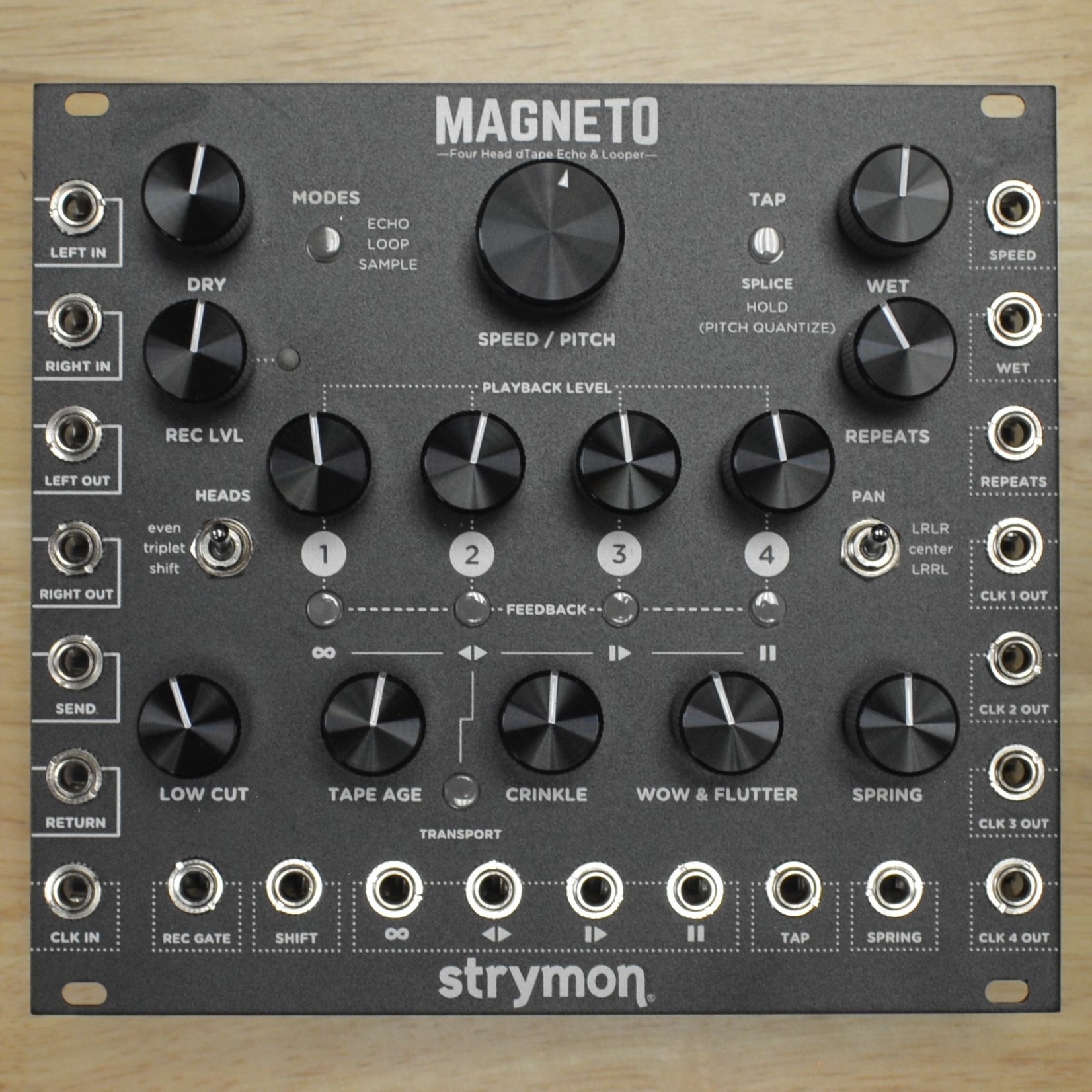
Delay
- What It Does: Repeats the audio signal after a time delay, creating echoes.
- Eurorack Specifics:
- CV Modulation: Modulate delay time, feedback, or mix level using an LFO or envelope generator.
- Types: Analog delay (warm, lo-fi), digital delay (clean, precise), and tape delay emulation (vintage character).
- Uses:
Rhythmic effects.
Creating space and texture in a patch.
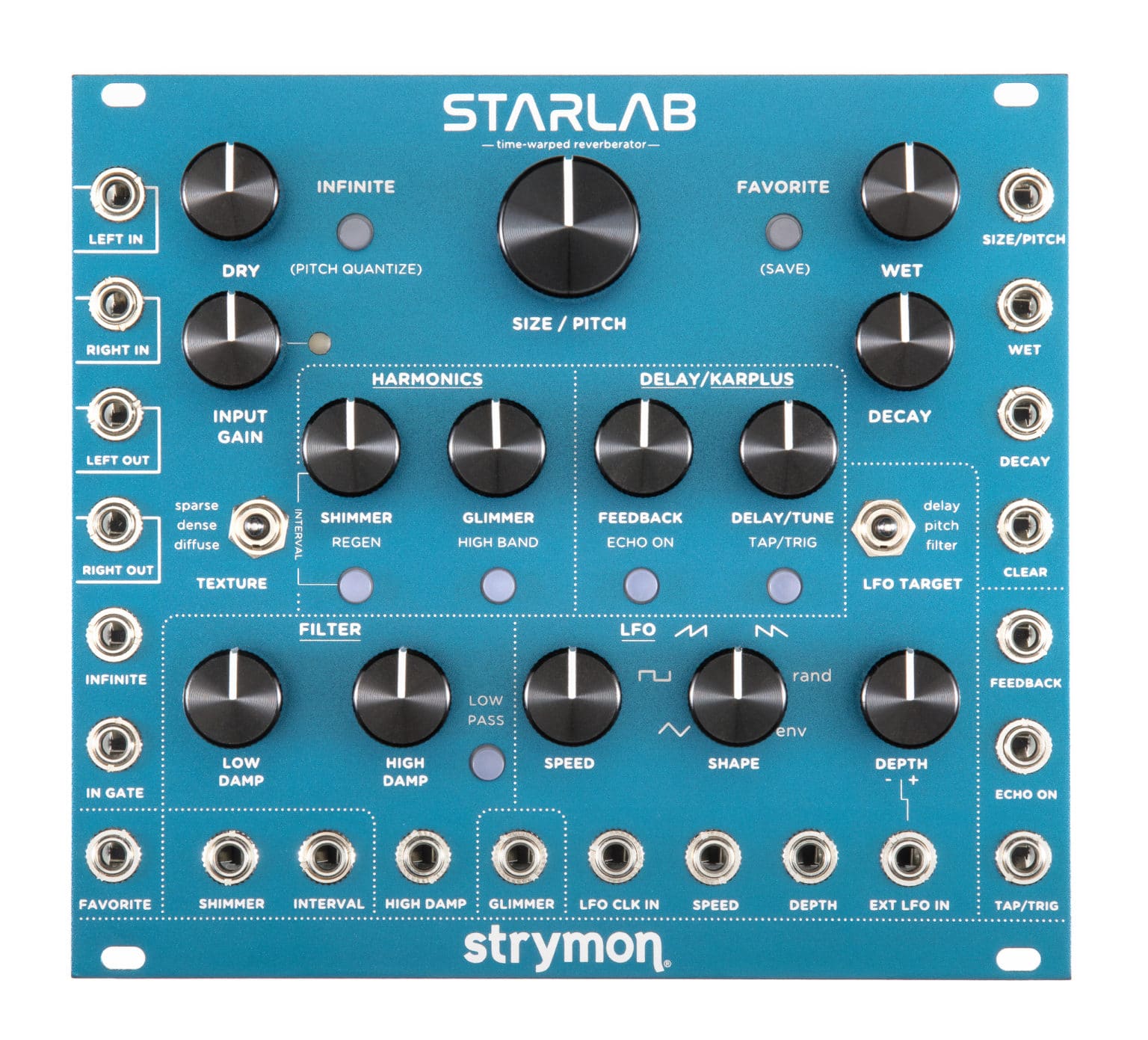
Reverb
- What It Does: Simulates the natural reflections of sound in physical spaces.
- Eurorack Specifics:
- CV Modulation: Control reverb size, decay, or wet/dry mix for dynamic spatial effects.
- Types: Room, hall, plate, shimmer, and granular reverb.
- Uses:
Adding ambiance.
Turning raw sounds into lush, immersive textures.
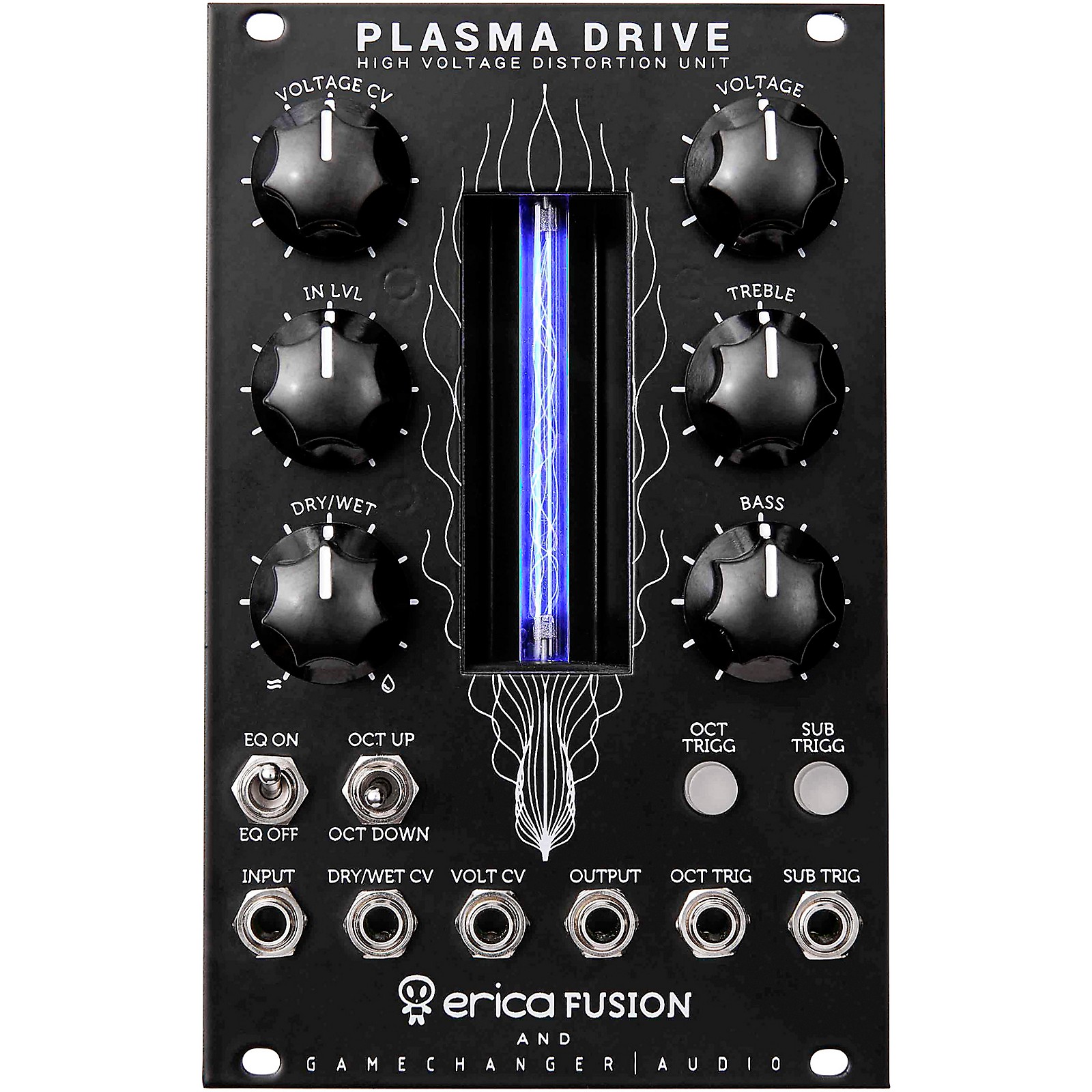
Distortion/Saturation
- What It Does: Adds harmonic content by overdriving the signal, creating warmth or aggressive tones.
- Eurorack Specifics:
- CV Modulation: Modulate the drive amount or mix for dynamic changes.
- Types: Soft clipping (warm, subtle) and hard clipping (harsh, aggressive).
- Uses:
Adding grit to basslines or leads.
Creating industrial, aggressive sounds.

Chorus/Flanger/Phaser
- What It Does: Modulates and duplicates the signal to create movement and thickness.
- Chorus: Slight detuning for shimmering effects.
- Flanger: Comb-filtering for swooshing sounds.
- Phaser: Phase-shifted layers for swirling, evolving textures.
- Eurorack Specifics:
- CV Modulation: Control modulation speed, depth, or feedback for evolving sounds.
- Uses:
Creating stereo width.
Adding movement to static sounds.

Granular Processing
- What It Does: Breaks audio into tiny grains and manipulates them for unique textures.
- Eurorack Specifics:
- CV Modulation: Control grain size, position, or pitch for complex, evolving effects.
- Uses:
Ambient soundscapes.
Experimental glitch effects.

How to Patch Effects in a Eurorack System
- Audio Input:
- Send the output of your sound source (VCO or sampler) into the input of the effect module.
- Control Voltage Modulation:
- Patch an envelope generator, LFO, or sequencer into the CV input of the effect module to modulate parameters like delay time, reverb decay, or filter cutoff.
- Audio Output:
- Route the output of the effect module to the VCA, mixer, or final output.
Step-by-step
Guide to patching a modular synth

Step 1: MIDI to CV Interface
- MIDI Connection:
- Connect your MIDI controller or DAW to the MIDI to CV interface via a MIDI cable or USB.
This interface converts MIDI notes and velocity into control voltages (CV) and gate signals.
- Outputs from MIDI to CV Interface:
- Pitch CV Output (1V/Oct): Sends pitch information to your oscillator.
- Gate Output: Triggers envelopes and other modules when a MIDI note is played.
- Velocity CV (if available): Adds dynamics to your patch, modulating volume or filter cutoff based on how hard you play.

Step 2: Pitch to Sound Source (Oscillator – VCO)
- Patch the Pitch CV:
- Patch the Pitch CV output of the MIDI to CV interface to the 1V/Oct input of your oscillator (VCO).
This ensures the oscillator plays the correct pitch corresponding to the MIDI notes.
- Choose a Waveform:
- Select a waveform on your VCO (e.g., saw, square, or sine) to define the basic timbre of your sound.
- Output to Mixer (Optional):
- For a multi-oscillator patch, mix multiple oscillators to create richer sounds. Use a mixer module before proceeding to the filter.

Step 3: Filter (VCF)
- Send VCO Output to the Filter:
- Patch the audio output of the VCO to the audio input of the VCF.
This allows the filter to shape the harmonic content of the oscillator’s sound.
- Filter Envelope Modulation:
- Patch the Envelope Generator (ADSR) output to the filter cutoff CV input of the VCF.
This will dynamically modulate the filter cutoff as the envelope progresses (e.g., for sweeping effects or plucks).
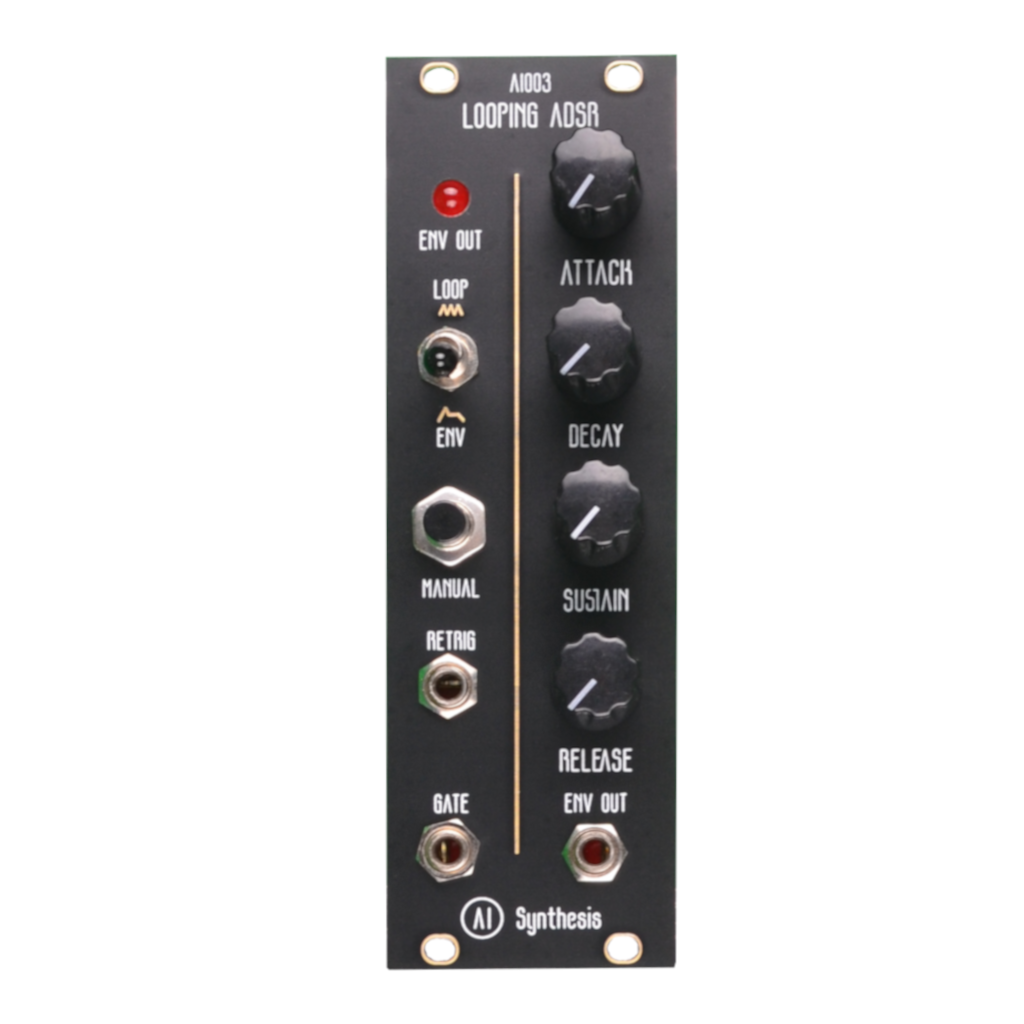
Step 4: Envelope Generator (ADSR)
- Gate Trigger:
- Patch the Gate output from the MIDI to CV interface to the Gate input of the ADSR envelope generator.
This ensures the envelope is triggered each time a MIDI note is played.
- ADSR Output to Filter:
- Patch the ADSR output to the VCF cutoff CV input to dynamically control the filter behavior.
- ADSR Output to VCA:
- Patch the same or another ADSR output to the VCA CV input to control the amplitude of the sound.
- If your ADSR module has multiple outputs, you can use one for the filter and another for the VCA to keep them independent.

Step 5: Amplification (VCA)
- Audio Path to VCA:
- Patch the VCF audio output to the audio input of the VCA.
This sends the filtered audio signal for amplitude shaping.
- VCA Modulation:
- Connect the ADSR envelope output to the CV input of the VCA.
The envelope will now control the amplitude, creating a dynamic volume contour.
- Adjust Knobs:
- Use the VCA’s CV attenuator to control how much the envelope affects the volume.

Step 6: Effects (Reverb, Delay, etc.)
- VCA Output to Effects:
- Patch the VCA audio output to the audio input of your effects module (e.g., reverb, delay, or distortion).
- Effects Output to Mixer:
- Patch the output of the effects module to your final destination (e.g., a mixer module or audio interface).
- Wet/Dry Control:
- Adjust the wet/dry mix on your effects module to balance the processed and raw signal.
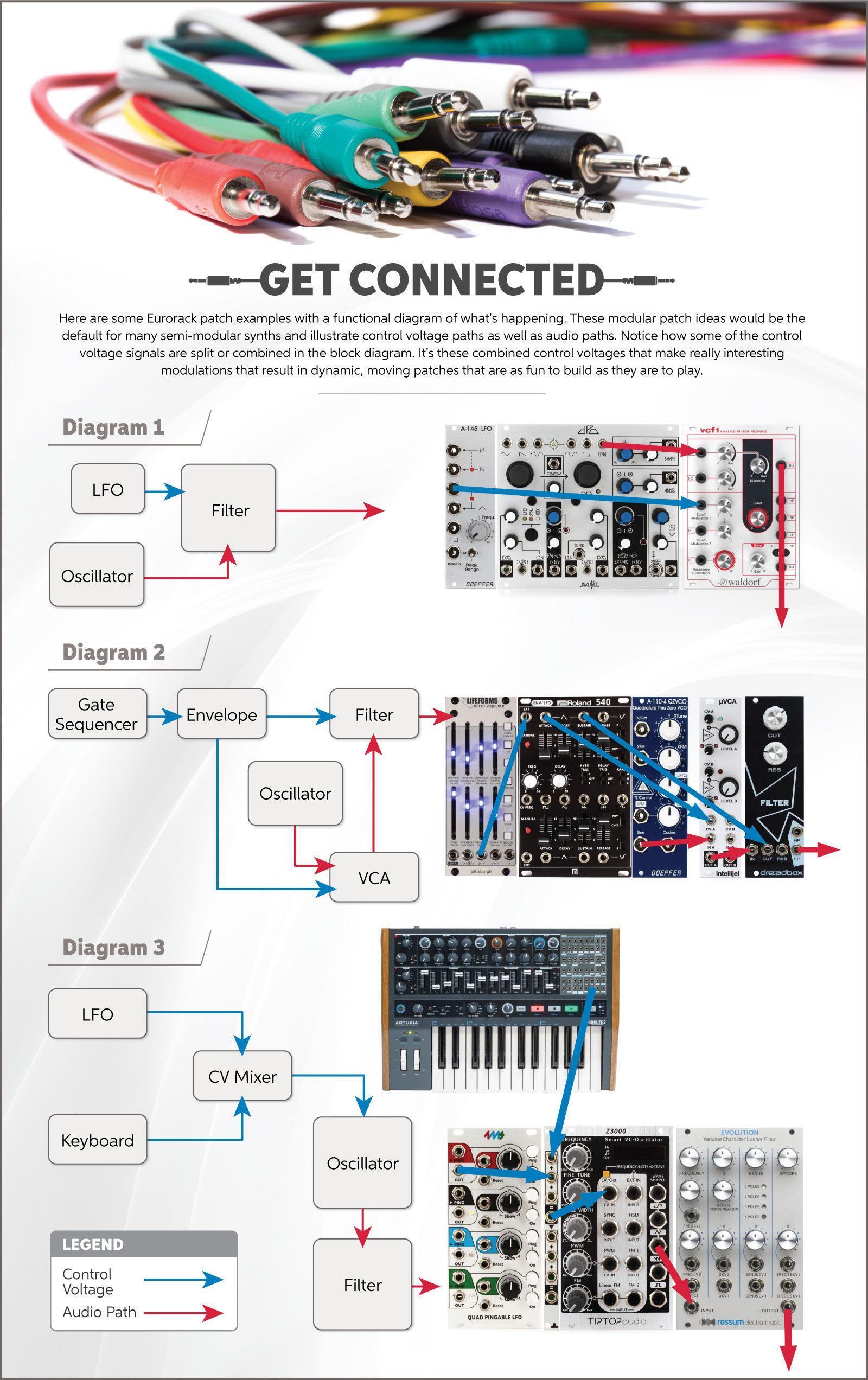
Complete Signal Flow
- Control Path (CV/Gate):
- MIDI to CV (Pitch CV) → VCO 1V/Oct.
- MIDI to CV (Gate) → ADSR Gate Input.
- ADSR Output → VCF Cutoff CV Input.
- ADSR Output → VCA CV Input.
- Audio Path:
- VCO Output → VCF Input.
- VCF Output → VCA Input.
- VCA Output → Effects Module Input.
- Effects Output → Mixer or Output Interface.
Modular Modules: Beyond the Basics

Modulation: LFOs & Envelopes
Low-Frequency Oscillators (LFOs) introduce periodic modulation, adding movement and texture to your sounds. For instance, an LFO can be used to create vibrato by modulating the pitch of a Voltage-Controlled Oscillator (VCO), or tremolo by modulating the amplitude via a Voltage-Controlled Amplifier (VCA). Envelopes, on the other hand, shape the dynamic character of a sound by controlling its attack, decay, sustain, and release (ADSR). A fast attack and short decay on an envelope applied to a VCA can create a sharp percussive sound, mimicking a snare drum hit.
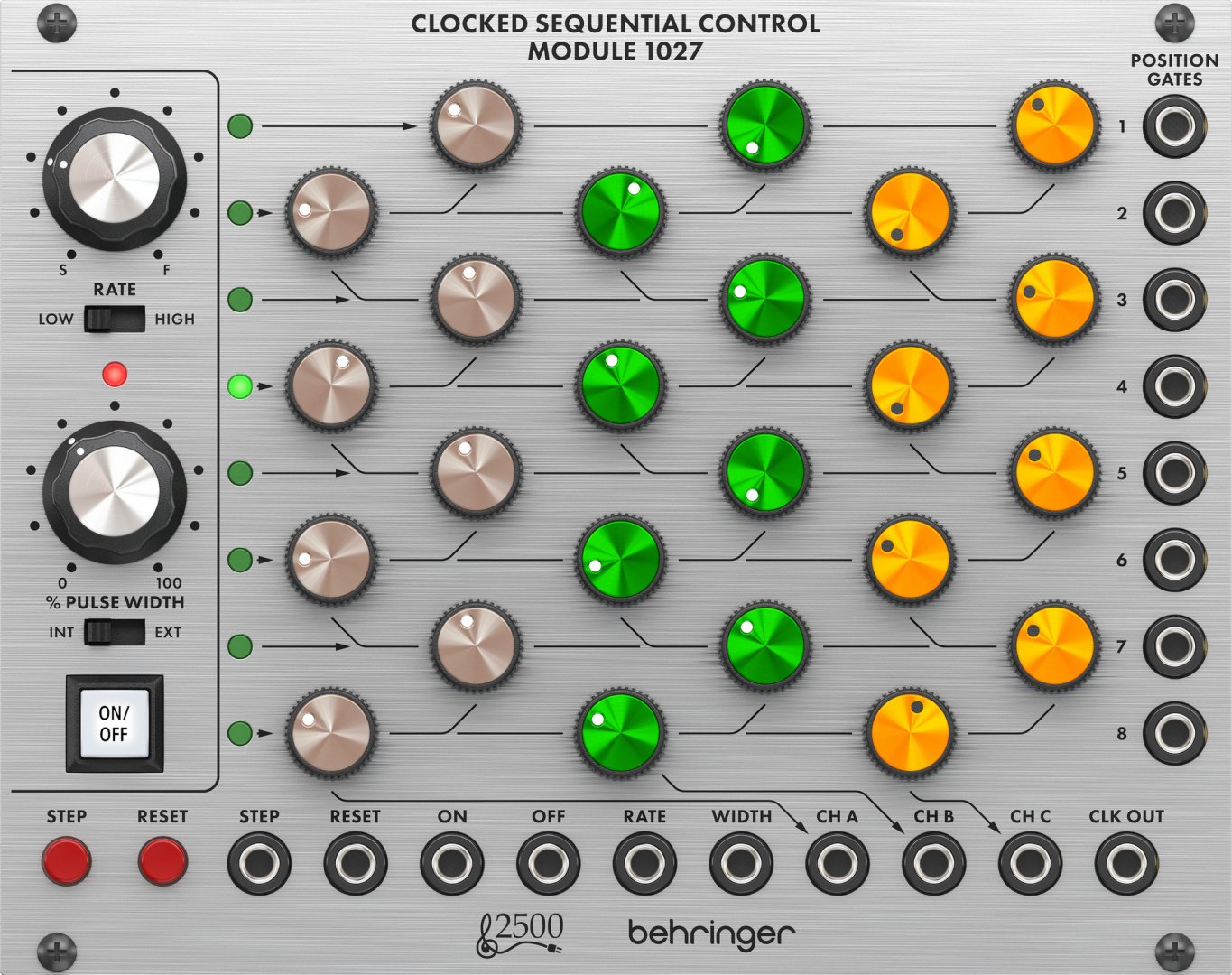
Sequencing & Control
Sequencers and controllers offer rhythmic and melodic control over your modular setup.
Imagine using a sequencer to generate a repeating pattern of CV signals that control the pitch of your VCO, creating a rhythmic bassline or melodic sequence.
These controllers allow for automation of signals, facilitating the creation of complex and evolving patterns.
Furthermore, external controllers like keyboards can provide real-time control over parameters like pitch, filter cutoff, and VCA gain, adding a layer of expressive performance to your sound design.
Beyond the Basics: Advanced Patching Techniques
Creating Percussion
Short, sharp envelopes (ADSR envelopes with fast attack and short decay) can create percussive sounds by modulating the VCA or the filter. For instance, route the envelope’s output to the VCA’s input to control the amplitude. A quick attack simulates the impact of a drum hit, while a short decay gives it a snappy feel. Experiment with different envelope shapes and filter cutoff modulation for variations.
Evolving Pads
Combine multiple VCOs, each with slightly detuned oscillators, and modulate them slowly using LFOs and random voltage generators. Route the LFOs to control parameters like pitch, filter cutoff, and VCA gain, creating subtle shifts in timbre and volume. Adding a slow-changing random voltage to the mix introduces unpredictable variation for evolving textures.
Noise Textures
Pass white noise from a noise generator through a resonant low-pass filter (VCF). Manipulating the filter’s cutoff frequency with LFOs or envelopes creates wind-like whooshes, textured drones, or percussive impacts. A high resonance creates a sharper, more metallic sound, while a lower resonance leads to warmer, more ambient textures.
Sample & Hold
Use a sample and hold module to create glitchy, unpredictable textures by applying random CV modulation to its input. The module “samples” a voltage at random intervals and “holds” it until the next sample. Routing this output to various parameters like pitch, filter cutoff, or LFO rate can generate unpredictable changes that add interest and randomness.
Applications of Modular Synths in Real-World Sound Design
Film Scoring
Modular synths are excellent for creating atmospheric soundscapes, tension-building drones, and sci-fi sound effects, adding depth and emotion to film scores.
Game Audio
The flexibility of modular synths allows for dynamic, interactive soundscapes, generating evolving textures and unique sound effects for video games.
Commercials & Ads
Modular synthesizers can create distinctive sonic logos, sound identities, and unique sound effects that capture attention and enhance brand recognition.
Modular Workflow: Tips & Best Practices
Signal Flow Awareness
Always consider the source, modifier, and output modules. Understand the signal flow to control the sound effectively.
Modulation Control
Avoid excessive modulation; it can create uncontrolled or muddy sounds. Start with a subtle approach and gradually increase modulation.
Patching Order
Begin with a simple patch and gradually add complexity to explore new sonic possibilities.
Documentation
Keep notes or photos of your patches to easily recreate them later or share your creative process with others.
Next Steps: Continuing Your Modular Journey
Congratulations! You’ve taken your first steps into the fascinating world of modular synthesizers. As you continue your journey, experiment, explore, and most importantly, have fun! There are endless possibilities for creating unique and expressive sounds with modular synthesizers.z
 Ivy Music